|
|
MFlanger
MFlanger is a traditional flanger but with a variable oscillator shape for greater flexibility, and integrated tube saturation. This adds up to a responsive plugin with a quintessential analog sound.
|
MAutoEqualizer, automatic mastering equalizer & analyzer, linear-phase equalizer
MTotalBundle 3.01 changes
- MAutoEqualizer optimized and improved accuracy, added upsampling and optimized mode for even faster response.
- Smoothness in signal generators and analyzers optimized by 200%-1600%
- Added draw mode in envelope editor, added middle mouse button drawing.
- Added band pass for modulator follower mode.
- Mouse wheel zooming in graph editors now zooms "to point".
- Improved analysis precision.
- Fix: Link didn't work correctly in some multiband plugins.
- Fix: Lock in envelope editor didn't lock the point completely.
- Fix: Modulator/multiparam learn deleted unchanged parameters relative to modified.
- Fix: Graph editor generated weird shapes for multiple points in the same position.
- Fix: Plugins could crash after receving program change.
MAutoEqualizer 3.01beta changes
- Multiparameters can now work as switchers or triggers, which modify target
values over certain time period.
- Added processing shape for MAutoEqualizer, which can affect automatic equalization results.
- Multiparameters range can now be automatized and default value can be configured.
- Plugins are now reporting tail in VST3 and AU, which can be used by host for otimizations.
- Fix: Multiparameter values weren't stored properly.
- Fix: Plugins weren't recognizing spacebar on Mac OS X.
- Fix: Multiband plugins didn't report latency accurately enough in linear-phase & hybrid modes (differs by 1 sample).
- Fix: Copy&paste in color dialog in style settings didn't work.
- Fix: Installers on certain Windows system failed because of a missing system directory.
- Fix: VST3 compatibility with FL Studio.
MAutoEqualizer 3.00 changes
- Kernel heavily upgraded and optimized.
- Smart-learn feature for all modulators & multiparameters -
just enable it and move anything in the plugin and the modulator/multiparameter
will learn what parameters you used including intervals.
- A-H presets can be switched via program change MIDI message.
- MAutoEqualizer bypassed temporarily when computing new settings.
- Last randomization can be undone by holding shift and pressing Random button.
- Optional confirmations on destructive actions.
- Added bypass to the title.
- Fix: Single band case hasn't compensated for latency correctly.
- Fix: MIDI & general settings save/load.
- Fix: Disabling modulator resets original parameter values incorrectly.
- Fix: Preset selector couldn't expand/collapse folders.
- Fix: MAutoEqualizer reset didn't reset all parameters.
MAutoEqualizer 2.09 changes
- Added automation/change protection for maximum & adjustable quality when changing parameters.
- Added shape transformation to all multiparameters.
- ABCD morphing now automates only relevant parameters to save storage and minimize hosts CPU hit.
- Automation/change protection is now "high" by default.
- Added multiparameter name.
- Randomization & loading now reinitializes plugin to remove possible artifacts from previous state.
- Fix: Some help windows weren't sized correctly.
MAutoEqualizer 2.08 changes
- Optimized processing for host without channel reporting, such as Reaper.
- Fix: Latency reporting.
- Fix: MS encoder wasn't working correctly.
- Fix: Multiparameters and parameters controlled by ABCD morphing weren't recording automation.
- Fix: Compatibility fixes for Wavelab.
MAutoEqualizer 2.07 changes
- Added LR/MS/L/R/M/S/LR-/surround processing - almost all plugins can now
process stereo-mono, just left, just stereo and other combinations instead of left-right channels.
- Added random move feature - when you hold ctrl and press "Random" button,
no new random settings are generated, but the current configuration
is slightly modified. This is useful to tweak already interesting settings.
- Clumsy configuration menu replaced by a configuration window.
- Graphical improvements.
- Added help for equalizer band editors.
- Fixed several compatibility issues, especially on Mac OS X (Digital Performer)
and Windows 64 (Cubase 5).
- Fix: Cancel in submit preset did send the preset anyway.
- Fix: Upsampling could crash on hosts with multicored initialization.
MAutoEqualizer 2.06 changes
- Improved upsampling algorithm performance.
- Improved compatibility with several hosts.
- Fix: Latency reporting.
- Fix: Plugin reset removing tails.
- Fix: Multichannel processing wasn't optimized enough and caused crashes.
- Fix: AU MIDI input.
- Fix: Denormalization problems causing high CPU usage when processing silence.
MAutoEqualizer 2.05 changes
- Added mono and surround compatibility - most plugins can now handle from 1 to 8 channels.
- Fix: Denormals causing low speed of upsampling.
MAutoEqualizer 2.04 changes
- Added tree parameter selectors for easier workflow.
- Added soft saturation feature.
- Added integrated activation by drag & dropping your licence file into the plugin or using system clipboard.
- Improved upsampling filters.
- Improved style for better visibility.
- Improved Mac OS X compatibility.
- Added "Submit preset" to send settings to MeldaProduction to be included in next versions. Good preset creators may be awarded by free software.
- Fix: Text editing in controllers, modulators & multiparameters.
- Fix: Advanced band editor didn't update main editor.
- Fix: Upsampling could cause ceiling to 0dB.
- Fix: Assembler optimizations could cause problems.
MAutoEqualizer 2.03 changes
- ABCD morphing feature.
- High-quality upsampling engine.
- Improved Windows 64-bit and Mac OS X compatibility.
- Immediate editor resizing.
- Kernel optimizations.
- Graph rendering optimized.
- Randomization improved to apply only on useful parameters.
- Improved Mac OS X installer.
- Fix: Text value editing in modulators, MIDI controllers and multiparameters.
- Fix: Drag using trackers outside of window caused jumping to the other side.
- Fix: Upsampling controller sometimes contained invalid value after loading.
MAutoEqualizer 2.02 changes
- Advanced band editors.
- Preset storage optimized.
- Fix: Modulator could replace values on loading presets.
- Fix: Added modulator target did not preserve original value.
MAutoEqualizer 2.01 changes
- Added harmonics control.
- Added separate feature - automatic equalization which tries to remove
frequencies used in the mix resulting in more clear and less muddy sound.
- Added analysis of several types of drums.
- Added multiparameters - automatable parameters, which control
other parameters.
- Advanced automation/modulation zipper noise protection.
- Added up-only mode for all controllers and LFOs.
- Preset export/import.
- GUI optimizations.
- Fix: Advanced settings were occasionally not stored correctly.
MAutoEqualizer 2.00 changes
- Stylable & resizable GUI engine.
- Switched to keyfile licencing.
- Added frequency range for automatic equalization.
- Clipboard format is now shared between all editions.
- Kernel optimizations.
- Demo now shows intro window instead of the bottom big bar.
- Fix: Unnamed presets are avoided.
MAutoEqualizer 1.06 changes
- Hierarchical preset management.
- Added "all channels" value for MIDI controllers.
- Added "up-only" mode for MIDI controllers.
- Modulation wheel assigned by default for MIDI controllers.
- Graphics have been optimized.
- Improved enable button highlighting.
- Fix: 64-bit host support.
MAutoEqualizer 1.05 changes
- MIDI controllers - the plug-in can now be controlled using any MIDI controller or keyboard.
- Improved protection against clicks when automated.
- Increased visibility of units shown when moving graphs.
- Added protection for visual glitches when automated.
- Automation parameter names changed to some more logical ones.
- Fix: Minimization of preset window.
- Fix: Preset management didn't work correctly.
MAutoEqualizer 1.04 changes
- Help windows are now scrollable and can fit better for various resolutions.
- Added replace preset into preset management.
- Improved tracker control accuracy using Ctrl key.
- Copy/paste now works between mini/standard version.
- Display axes are now truly logarithmic.
MAutoEqualizer 1.03 changes
- Added MAutoEqualizerMini and MAutoEqualizerLinearPhaseMini plug-ins.
- Improved dry/wet for non-linear mode of linear phase version.
- Psycho-acoustic modulation disables slope.
- Fix: Logarithmic averaging shape.
MAutoEqualizer 1.02 changes
- Added A-H presets and full settings copy/paste to clipboard.
- Added equalizer bands copy/paste to clipboard.
- Added dry/wet parameter for non-linear-phase equalizer
(approximates the requested response, linear-phase mode works 100%)
- Averaging reimplemented to logarithmic mode which is more objective.
- The most mportant parameters highlighted using bold font for better orientation.
- Psycho-acoustic modulation is no longer applied on analysis.
- Source analysis now shows red graph to avoid confusion.
- Fix: Draw comparison did not correctly handle slope.
MAutoEqualizer 1.01 changes
- Added gain parameter.
- Fix: Units when zoomed into the spectral graph.
- Fix: Latency report.
- Fix: Wavelab 6 support for mono files.
Download the newest version here.
If not activated, the software stays in demo mode, which
generates noise from time to time and opens our website on start-up and
contains a clickable region, which opens our website.
To evaluate this software it is recommended to download
MTotalBundle which contains
all of our plug-ins.
|
Windows (6 MB, 3.01) Windows (64-bit) (10 MB, 3.01)
Download & run. It is safe to install the software if you have
an older version already installed.
|
|
Mac OS X (13 MB, 3.01)
Download & run. It is safe to install the software if you have
an older version already installed.
|
Resources
Download printable PDF documentation
Updates
To update the software you have following choices:
a) Use Update manager to install all necessary updates automatically.
b) Download and run the update bellow.
c) Use new installer, there is no need to uninstall your current installation.
Following installers update MAutoEqualizer to 3.01.
Buy now! It's quick and easy!
Click on the button below to perform purchase via PayPal
(you do not need a PayPal account).
You will receive your license key a few minutes after the payment.
If you do not receive your key within ten minutes, please forward your payment receipt to our support via
info@meldaproduction.com and we will manually send you your license key again.
Note that free-for-life updates apply for all our effects and bundles.
Therefore once you buy an effect, all improvements will be free for you forever.
If you buy a bundle, even all effects added to the bundle later will be free for you!
249 EUR362 USD
Bundles
This software is available also in following bundles.
But purchasing a bundle you get much better price and the
free-for-life updates gives you right to any plug-ins we
will release and add to the bundle for free.
| MTotalBundle | 599 EUR 872 USD | | MMasteringBundle | 399 EUR 581 USD |
Education discounts
Are you a student? Teacher? You can have a 50% discount!
Click here to read more about education discounts.
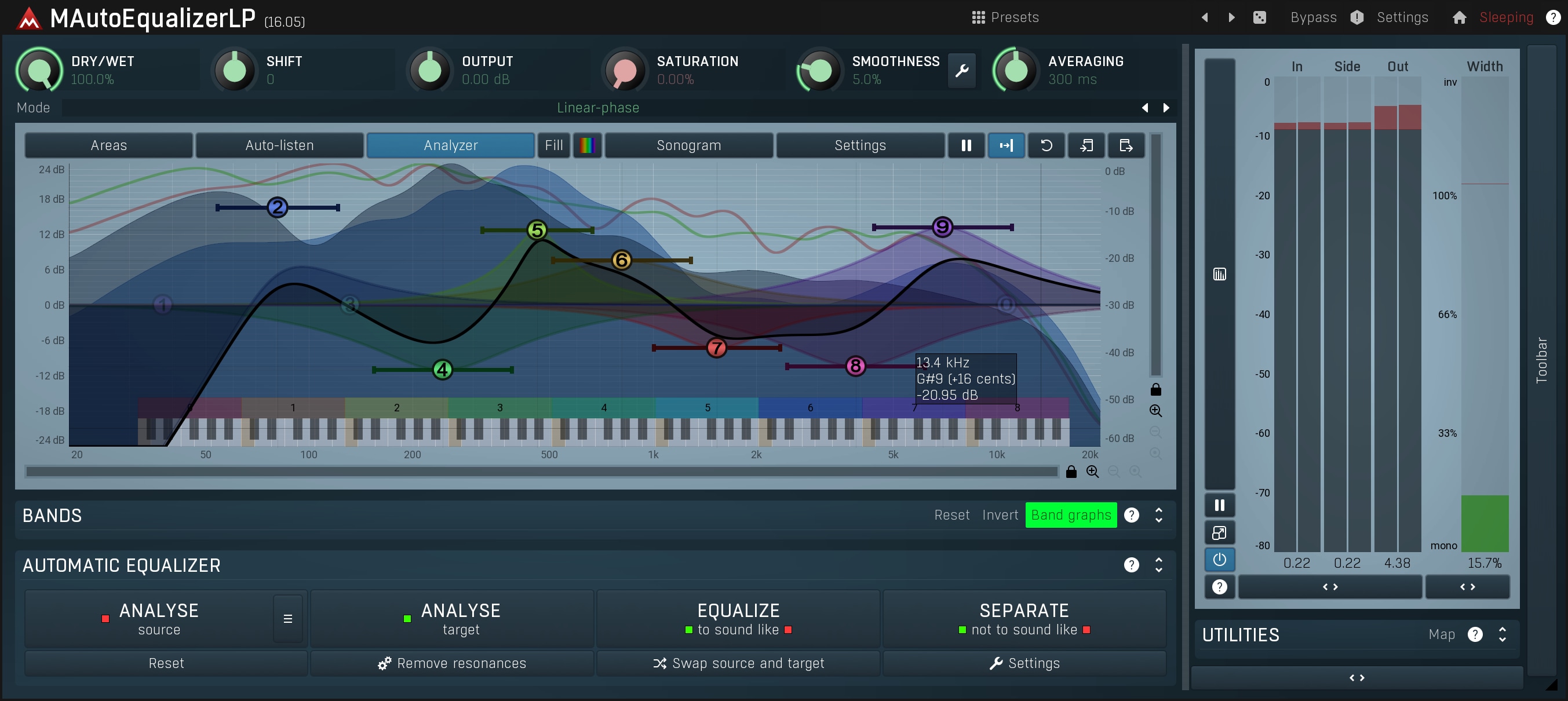
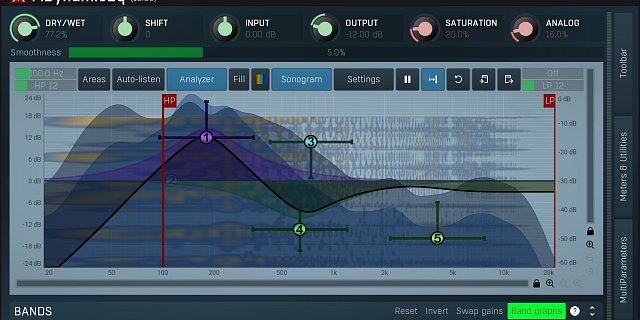
MAutoEqualizer is the world's first true parametric (linear-phase) equalizer
providing spectral matching!
- The best audio quality out there!
Parametric equalization provided by MAutoEqualizer cannot be matched by
simple FFT-based algorithms. MAutoEqualizer provides true analog
sound and 2 top-class linear-phase algorithms.
- Fully adjustable linear & minimum phase parametric equalizer!
Unlike common spectral matching algorithms
our automatic equalization configures all bands of the equalizer only.
No black box, you see exactly what it is doing.
It only does what you would do, but it does not suffer from
lack of experience, ear-fatigue or exhaustion.
And when you don't like what it does, you can just change it!
- Extremely versatile, useful for everything from mixing to mastering!
You can make your recordings sound professional.
You can ensure all of your recordings on your new album sound similar.
You can let MAutoEqualizer fit a track into a mix using spectral separation feature.
You can draw your desired frequency response.
In any case MAutoEqualizer will find the best settings
and configure the parametric equalizer bands for you.
With a standard equalizer you are listening to the spectrum and amplifying or
attenuating frequencies. This is very difficult even if you are a very experienced user
with advanced listening skills. With MAutoEqualizer
you no longer need to worry about your ears being objective.
The package contains 4 equalizers -
zero-latency minimum phase version MAutoEqualizer,
linear-phase version MAutoEqualizerLinearPhase and
simplified versions MAutoEqualizerMini and
MAutoEqualizerLinearPhaseMini
created for those
who do not have the luxury of high-resolution displays.
Their GUI is much smaller and it contains only necessary features.
Testimonial
Very easy and fun to use. You can sample the eq curve of a commercial tune that
you want to sound similar to, sample the song that you are working on and get
it to match the eq frequencies of the commercial tune. It does this by using a
familiar parametric eq format, so you can further tweak what works best for your song.
It also has a wet dry mix slider to take it from no applied eq to the full eq curve that
matches your sample song. You see the eq curve change in the graph while you are adjusting the slider.
I love this plug. It is so cool to see what the parametric eq does to your song
to achieve the desired frequency response. A lot of fun.
Ken Lancaster
|
|
|