MUltraMaximizer
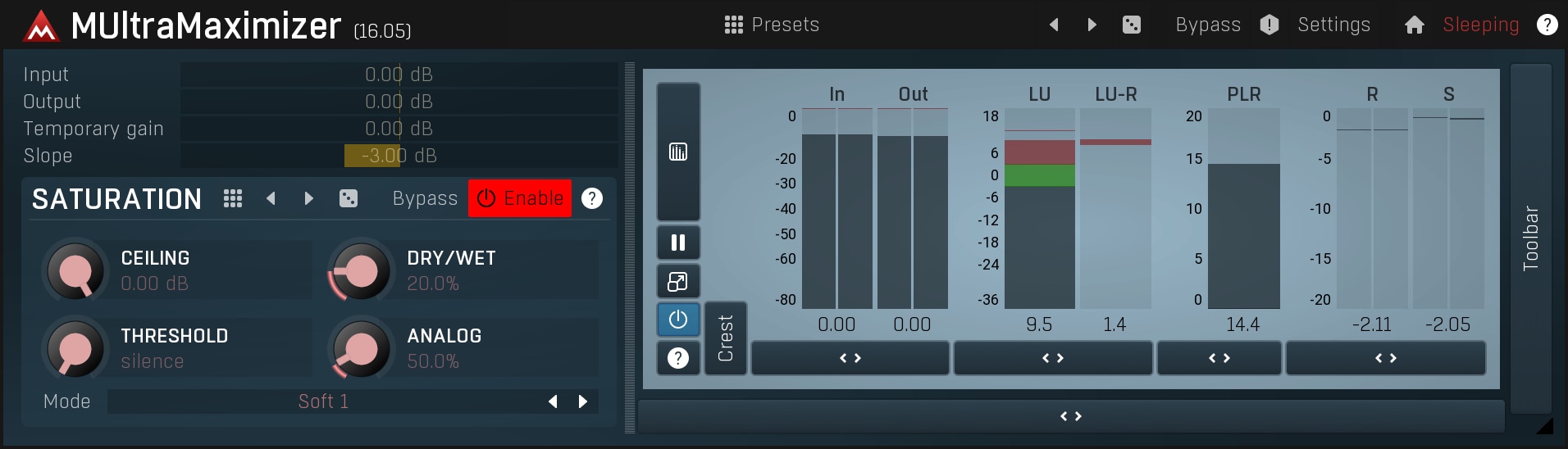
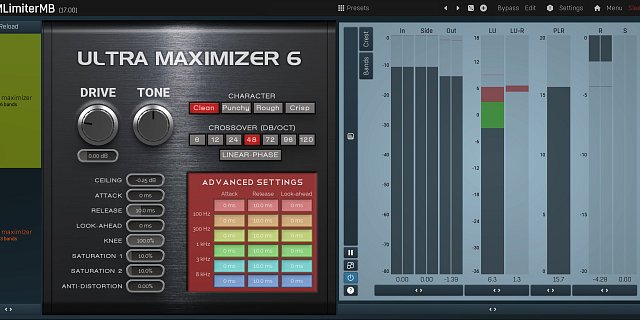
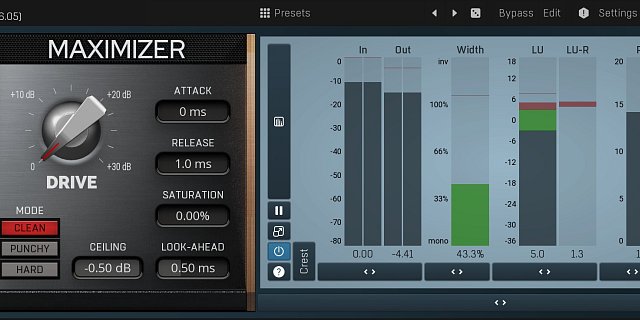
MUltraMaximizer is a fatal weapon that lets you win the loudness war and is affordable to everyone!Using a few controls MUltraMaximizer can basically do the limiting for you with outstanding quality. It is a simplified, extremely easy-to-use and cheap alternative to MMultiBandLimiter, one of the most advanced multiband limiters in the world.
|
|
Windows XP/Vista/7 (32-bit or 64-bit) VST/VST3 compatible host (32-bit or 64-bit) Intel/AMD processor, SSE2 & multi-core support recommended RTAS has officially been dropped, but AAX shall be implemented instead. |
|
![]()
|
Mac OS X (10.5 and newer, 32-bit or 64-bit) VST/VST3/AU compatible host (32-bit or 64-bit) Intel/AMD processor, SSE2 & multi-core support recommended RTAS has officially been dropped, but AAX shall be implemented instead. AU version is not compatible with Apple SoundTrack Pro and Vienna Ensemble. AU note: in some hosts, the GUI is not shown for the first time, please just restart the host then. |
64-bit Windows note - the plugin version must be compatible with your host. On 64-bit operating system you can have 32-bit and 64-bit hosts. If your host is 64-bit, you need 64-bit version of our plugins. If your host is 32-bit, you have to use 32-bit version of our plugins.
Licence protection - The software currently uses keyfile licencing. No dongles, hardware devices nor internet connection are required. Keyfiles contain your personal information, so if you share it, you will be traced and prosecuted.
MUltraMaximizer 5.06 changes
- All plugins are now Mac64 compatible.
- Improved GUI behaviour, especially on Apple.
- Analyzers & sonograms now work only if the plugin window is open to save CPU.
- Fix: Plugins were silent in Sonar with mono tracks in L+R mode.
- Fix: Analyzer peak points were not accurate.
MUltraMaximizer 5.05 changes
- Added stabilization parameter for modulator pitch detectors to avoid quick changes.
- Improved highlight of the selected band type in parametric equalizers.
- Mono/Stereo have been renamed to Mid/Side.
- Installers of separate plugins now provide enabling or disabling interfaces.
- Fix: MDynamicEq and MAutoDynamicEq were not working correctly in surround mode.
MUltraMaximizer 5.04 changes
- All plugins can now change default settings - check the big button in Settings/Settings.
- Low-quality zero-latency upsampling algorithm highly improved.
- All multiband plugins now have multiple analog crossovers with slope from 12dB/oct to 120dB/oct.
- You can temporarily activate band link by holding alt key and moving a parameter in multiband plugins.
- Added detection range for modulator's pitch detector to filter out frequencies outside of range of the particular instrument.
- Plugins now update all parameters after a preset has been loaded.
- Optimized multiple parameter automation.
- Parametric equalizers now have first band low-shelf and last high-shelf by default.
- Improved flicker free resizing in some hosts.
- All textual edits of time are now in milliseconds to avoid numbers like 0.001.
- Multiband plugins now remember 0%/100% dry/wet buttons when browsing presets.
- Channel modes are now available from the main screen.
- Fix: Smothness didn't work correctly upon startup in many plugins containing an analyser.
MUltraMaximizer 5.03 changes
- It is now possible to override the default editor size in Settings.
- Added threshold and high-accuracy mode to pitch mode of modulators.
- Added check for updates feature into each plugin's settings.
- Fix: VST3 was causing crashes under some hosts and specific configurations.
- Fix: Envelope draw mode didn't work well with snap to grid enabled.
- Fix: Popup windows with some keyboard shortcuts could lead to a crash on Mac.
- Fix: Upsampling latency being reported was invalid.
MUltraMaximizer 5.02 changes
- LU meters can now show momentary, short-term and integrated loudness.
- Added pitch detection mode for modulators.
- Added higher-quality filters for upsampling rates above 200kHz.
- Easy screen active presets now automatically attach mouse wheel and MIDI controllers from 21 to easy screen knobs.
- Optimized updating of user interface when hidden.
- Random modulator mode now works even in wave editors, which do not provide tempo and position.
- Styles are now installed to both admin & user data folders to avoid problems with systems with user accounts.
- Fix: Mono->Stereo processing could cause crashes in some hosts such as bidule.
- Fix: Delete and backspace keys have been swapped on Mac.
- Fix: Loudness meters text value was showing "silence" with values under 0 LU.
MUltraMaximizer 5.01 compatibility update changes
Click here for information about upgrading to 5.00 if you are using an older version.
- Surround is now off by default, because it causes problems with some hosts (known are FL Studio and Studio One). If you use surround processing, please enable "Activate surround" in the plugin settings, it will enable all plugins at once.
- Plugins can now access additional volumes on Mac OS X.
- Band editor in equalizers doesn't close when clicking on a band type any more and shows filter steepness.
- Fix: Plugins could crash in AU when requested mono to stereo configuration.
- Fix: Styles are now moved to user data folder, because some computers have permission problem with all-users directory.
- Fix: MFilter caused massive gain in parallel mode in some special circumstances.
- Fix: Analyzer in equalizers didn't show correct spectrum if activated after upsampling change.
- Fix: MMultiBandConvolution didn't remember custom paths correctly on Mac OS X.
MUltraMaximizer 5.00 changes
Click here for information about upgrading to 5.00
- Dual user interfaces - most commercial plugins now contain 2 interfaces, a simple default one with several predefined modes, but just a few controls, and an advanced one. This makes the plugins not only extremely versatile, but also quick and easy-to-use.
- Unique new analysis engine for MAnalyzer and all equalizers - new analysis engine is faster, more accurate and provides a whole new range of unique features, such as micro-sonograms, full sonograms, super-resolution (providing high resolution for low frequencies keeping speed for the high frequencies), prefilters (for loudness curves) or deharmonization (for easier fundamental frequencies analysis).
- Plugins are now categorized under VST and VST3 - with more than 55 plugins it started to be hard to find the plugin you need, therefore they are now categorized by purpose to Dynamics, EQs etc. With VST3 they also fit the standardized structure in your host (if it supports it).
- Added next/previous preset buttons.
- Added A/B switch to swap between previous two A-H presets.
- Added 0% & 100% modes for global dry/wet for all multiband plugins.
- Increased accuracy when dragging Q in equalizers.
- Added "use first parameter's range" mode for modulators and multiparameters.
- Added a few shortcuts to control zooming in graph editors.
- Added global surround switch useful to make the plugins more compatible with some hosts.
- Added resizing arrow for resizable windows.
- Added smooth 2 envelope point mode.
- Upsampling range extended to 16x.
- Multiband peakmeters can now show different channels in surround.
- Optimized preset and settings storage.
- Preset exchange is now enabled by default, can be disabled in Settings.
- Slope can now be automated in MMultiBandLimiter and MUltraMaximizer.
- Fix: Resizing windows with splitters changed ratio of the splitters.
- Fix: Resizable windows were sometimes showing arrow cursor over a position, where the window couldn't be resized.
- Fix: Demoversions with sidechain were crashing occasionally.
- Fix: Plugins with sidechain were occasionally crashing on Mac AU.
- Fix: A Windows message was poping when trying to access an unavailable drive.
- Fix: Upsampling latency wasn't reported correctly.
- Fix: Improved automation support with Ableton Live.
- Fix: Plugins didn't store bypass state.
- Fix: Multiparameters in switch mode were showing inverted state.
- Fix: Alt+Click in a graph editor caused maximum zoom, which is now disabled.
- Fix: Units in zoomed mode were sometimes showing invalid grid lines.
- Fix: Temp gain wasn't updated when automated/modulated.
MUltraMaximizer 4.02 changes
- Graph editors now show smart units even in zoomed mode and snap-to-grid works as well.
- Fix: Updaters didn't work on Windows with some specific paths.
MUltraMaximizer 4.01 changes
- Minor fixes and optimizations.
MUltraMaximizer 4.00 changes
- Major performance improvements - our plugins are now even faster than before on modern processors. We measured processing improvements of up to 300% with some plugins and user interface is now much faster as well, especially on Mac OS X.
- Online preset exchange - all plugins can now automatically share your presets on our servers and download new ones (if enabled of course). This way everyone can have an unbelievable set of presets using our extremely versatile plugins. We are building a community and you can be a part of it!
- ADSR editors (e.g. in modulators) can now have custom shapes.
- Added step-sequencer generator into any envelope/graph editor.
- When activating you can now use drag & drop, clipboard and also locate the licence file using a browser.
- Fix: Trigger and switcher multiparameter modes weren't working correctly.
- Fix: Modulators and multiparameters weren't learning correct parameters of signal editor.
- Fix: Plugins could crash on Win64 when project exceeded 2GB.
- Fix: Plugins crashed when moving a multiparameter during learning.
MUltraMaximizer 3.02 changes
- Kernel highly optimized, especially for plugins with visualization.
- Added envelope editor snap-to-grid feature and advanced envelope editor menu.
- Added stairs & pulses envelope point mode.
- Plugins are now temporarily bypassed for time consuming actions such as loading presets.
- Now the plugins released in bundles can also accept single plugin licences for easier installation and activation.
- Fix: Occasional freezing under problematic hosts such as Wavelab.
- Fix: Mono/stereo encoding was sometimes failing in Logic.
- Fix: Copy&paste of modulators could result in a hang.
- Fix: Installer could hang on some multiprocessor systems.
MUltraMaximizer 3.01 changes
- Added draw mode in envelope editor, added middle mouse button drawing.
- Smoothness in signal generators and analyzers optimized by 200%-1600%
- Added band pass for modulator follower mode.
- Mouse wheel zooming in graph editors now zooms "to point".
- Improved analysis precision.
- Fix: Lock in envelope editor didn't lock the point completely.
- Fix: Modulator/multiparam learn deleted unchanged parameters relative to modified.
- Fix: Graph editor generated weird shapes for multiple points in the same position.
- Fix: Plugins could crash after receving program change.
MUltraMaximizer 3.01beta changes
- Plugins are now reporting tail in VST3 and AU, which can be used by host for otimizations.
- Fix: Plugins weren't recognizing spacebar on Mac OS X.
- Fix: Multiband plugins didn't report latency accurately enough in linear-phase & hybrid modes (differs by 1 sample).
- Fix: Copy&paste in color dialog in style settings didn't work.
- Fix: Installers on certain Windows system failed because of a missing system directory.
- Fix: VST3 compatibility with FL Studio.
MUltraMaximizer 3.00 changes
- Kernel heavily upgraded and optimized.
- Linear-phase/hybrid crossover quality improved and performance increased by 500%.
- A-H presets can be switched via program change MIDI message.
- Last randomization can be undone by holding shift and pressing Random button.
- Optional confirmations on destructive actions.
- Added bypass to the title.
- Fix: Single band case hasn't compensated for latency correctly.
- Fix: MIDI & general settings save/load.
- Fix: Disabling modulator resets original parameter values incorrectly.
- Fix: Preset selector couldn't expand/collapse folders.
- Fix: Hybrid crossover switch didn't update until band limits has been changed.
MUltraMaximizer 2.09 changes
- Added automation/change protection for maximum & adjustable quality when changing parameters.
- Added shape transformation to all multiparameters.
- ABCD morphing now automates only relevant parameters to save storage and minimize hosts CPU hit.
- Automation/change protection is now "high" by default.
- Added multiparameter name.
- Randomization & loading now reinitializes plugin to remove possible artifacts from previous state.
- Fix: Some help windows weren't sized correctly.
MUltraMaximizer 2.08 changes
- Optimized processing for host without channel reporting, such as Reaper.
- Fix: Latency reporting.
- Fix: MS encoder wasn't working correctly.
- Fix: Multiparameters and parameters controlled by ABCD morphing weren't recording automation.
- Fix: Compatibility fixes for Wavelab.
MUltraMaximizer 2.07 changes
- Added LR/MS/L/R/M/S/LR-/surround processing - almost all plugins can now process stereo-mono, just left, just stereo and other combinations instead of left-right channels.
- Added random move feature - when you hold ctrl and press "Random" button, no new random settings are generated, but the current configuration is slightly modified. This is useful to tweak already interesting settings.
- Clumsy configuration menu replaced by a configuration window.
- Graphical improvements.
- Added help for equalizer band editors.
- Fixed several compatibility issues, especially on Mac OS X (Digital Performer) and Windows 64 (Cubase 5).
- Fix: Cancel in submit preset did send the preset anyway.
- Fix: Upsampling could crash on hosts with multicored initialization.
MUltraMaximizer 2.06 changes
- Improved upsampling algorithm performance.
- Improved linear-phase and hybrid cross-over performance.
- Improved compatibility with several hosts.
- Fix: Plugin reset removing tails.
- Fix: Multichannel processing wasn't optimized enough and caused crashes.
- Fix: AU MIDI input.
- Fix: Denormalization problems causing high CPU usage when processing silence.
MUltraMaximizer 2.05 changes
- Added mono and surround compatibility - most plugins can now handle from 1 to 8 channels.
- Fix: Denormals causing low speed of upsampling.
MUltraMaximizer 2.04 changes
- Added tree parameter selectors for easier workflow.
- Added linear-phase and hybrid crossovers to existing analog crossover.
- Added integrated activation by drag & dropping your licence file into the plugin or using system clipboard.
- Improved upsampling filters.
- Improved style for better visibility.
- Added "Submit preset" to send settings to MeldaProduction to be included in next versions. Good preset creators may be awarded by free software.
- Improved Mac OS X compatibility.
- Fix: Upsampling could cause ceiling to 0dB.
- Fix: Assembler optimizations could cause problems.
MUltraMaximizer 2.03 changes
- ABCD morphing feature.
- High-quality upsampling engine.
- Added ceiling parameter.
- Improved Windows 64-bit and Mac OS X compatibility.
- Immediate editor resizing.
- Kernel optimizations.
- Randomization improved to apply only on useful parameters.
- Improved Mac OS X installer.
- Fix: Text value editing in modulators, MIDI controllers and multiparameters.
- Fix: Drag using trackers outside of window caused jumping to the other side.
- Fix: Upsampling controller sometimes contained invalid value after loading.
- Fix: Peak-meters occasionally missed peaks.
- Fix: Upsampling could cause overs.
MUltraMaximizer 2.02 changes
- Preset storage optimized.
- Fix: Modulator could replace values on loading presets.
- Fix: Added modulator target did not preserve original value.
MUltraMaximizer 2.01 changes
- Added multiparameters - automatable parameters, which control other parameters.
- Advanced automation/modulation zipper noise protection.
- Added up-only mode for all controllers and LFOs.
- Preset export/import.
- GUI optimizations.
MUltraMaximizer 2.00 changes
- Stylable & resizable GUI engine.
- Switched to keyfile licencing.
- Kernel optimizations.
- Demo now shows intro window instead of the bottom big bar.
- Fix: Unnamed presets are avoided.
MUltraMaximizer 1.01 changes
- Hierarchical preset management.
- Added "all channels" value for MIDI controllers.
- Added "up-only" mode for MIDI controllers.
- Modulation wheel assigned by default for MIDI controllers.
- Graphics have been optimized.
- Fix: 64-bit host support.
- Fix: Slope text update on A-H preset change.
General effect features and tutorials
| Introduction & features A quick introduction to MeldaProduction effects, their features and capabilities. | |
| Activation Editing and features of envelopes and shapes. | |
| Envelopes Editing and features of envelopes and shapes. | |
| Oscillators Editing and features of oscillators. | |
| Oscillators (creative possibilities) A practical example of using oscillators in our effects. | |
| Modulators Using modulators in creative effects to manipulate parameters. | |
| MIDI controllers Using MIDI controllers and notes to control parameters of the effects. | |
| Multiparameters & custom active presets Explains how to use multiparameters and how to create your own active presets with them. | |
| Mono-Stereo processing Explains how to use mono/stereo and other channel processing modes and describes a few useful techniques. |
Particular effect features and tutorials
| MAutoAlign, the automatic audio phase alignment solution Describes phasing issues and presents an extremely effective way to solve them. | |
| Creating vocals using MMultiBandHarmonizer This tutorial shows how to use MMultiBandHarmonizer to create vocals from the lead voice. | |
| Creating modern drums with MMultiBandDelay & MMultiBandRhythmizer This tutorial shows how to improve simple drum track using MMultiBandDelay and MMultiBandRhythmizer. | |
| Equalizers Compares MeldaProduction equalizers (parametric and freeform) and shows how to use them. | |
| Compressors, expanders, gates Explains how compressors, expanders and gates work and how to use them. | |
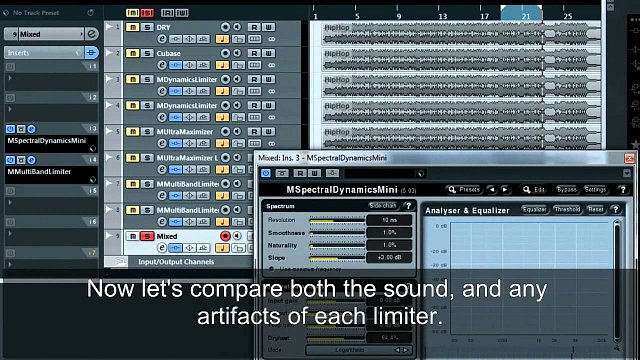
| Limiters and maximizers Compares different limiters, their artifacts and explains basics about loudness maximization. | |
| Improving audio from a portable recorder Explains how to easily and quickly improve recordings from the stereo portable recorders. | |
| Modulation audio effects comparison on an electric piano sound Describes how several modulation effects work and what can multiband design provide. | |
| The ultimate dynamic equalizers, MAutoDynamicEq and MDynamicEq Shows features of our ultimate "go to" dynamic equalizers, MAutoDynamicEq and MDynamicEq |
Download the newest version here.
If not activated, the software stays in demo mode, which
generates noise from time to time and opens our website on start-up and
contains a clickable region, which opens our website.
To evaluate this software it is recommended to download
MTotalBundle which contains
all of our plugins.
![]() | Windows (32-bit) (5.06, 3 MB) Windows (64-bit) (5.06, 5 MB) Download & run. It is safe to install the software if you have an older version already installed. |
![]() | Mac OS X (32-bit & 64-bit) (5.06, 7 MB) Download & run. It is safe to install the software if you have an older version already installed. |
Resources
Download printable PDF documentation
Note that all our products have integrated documentation, which you can view
using any of the question mark buttons and also by pressing F1 (or ctrl+F1) with
mouse cursor over a control you want to get info about.
Updates
To update the software you have following choices:
a) Use new installer, there is no need to uninstall your current installation (recommended).
b) Download and run the update installer bellow.
c) Use Update manager to install all necessary updates automatically.
![]() | Windows (32-bit) (5.06, 3 MB) Windows (64-bit) (5.06, 4 MB) | ![]() | Please use the newest installer from above to get the current version. There is no need to uninstall previous version. |
Buy now! It's quick and easy!
Click on the button below to perform purchase via PayPal. You will receive your license key a few minutes after the payment. If you do not receive your key within ten minutes, please forward your payment receipt to our support via info@meldaproduction.com and we will manually send you your license key again.
Note that free-for-life updates apply for all our effects and bundles. Therefore once you buy an effect, all improvements will be free for you forever. If you buy a bundle, even all effects added to the bundle later will be free for you!
Bundles
This software is available also in following bundles.
But purchasing a bundle you get much better price and the
free-for-life updates gives you right to any plugins we
will release and add to the bundle for free.
| MTotalBundle | 599 EUR 822 USD |
| MMasteringBundle | 399 EUR 547 USD |
Education discounts
Are you a student? Teacher? You can have a 50% discount!
Click here to read more about education discounts.
- State-of-the-art mastering multiband limiter and saturator which lets you increase the loudness of your audio to unbelievable levels with minimal artifacts.
- Powerful metering system - you always know the output level, gain reduction and saturation reduction. You can often get great results without even listening to it!
- M/S, single channel, up to 8 channels surround processing - our plugins can handle not only mono and stereo signals, but also mono/stereo encoding, separate channels and encodings, and up to 8 channels of surround audio, which makes them ideal for audio production for movies, games etc.
- Full randomization - using a single button you can generate completely new settings. By clicking the button you can walk through the billions of possible settings and find the best one for you! And if that's too much, you can just hold ctrl and MUltraMaximizer will only slightly modify existing settings.
- Adjustable up-sampling 1x-16x to minimize aliasing and get an even clearer sound. Includes both minimum-phase and high-quality linear-phase algorithms.
- Extremely advanced and easy-to-use user interface - our products are always designed to enhance the workflow. You can easily change all values, fine-tune each control in multiple ways. Easy orientation in a standardized GUI, textual editing and smooth visualization with almost unlimited zooming are standard in all of our plugins. Moreover our plugins are the world first (and still the only ones), which support resizable and stylable GUI's.
- MIDI controllers with MIDI learn - you can map any parameter to any MIDI controller or MIDI keyboard and control it realtime or record and automate it.
- Very fast, optimized for SSE and SSE2 processors.
- Global preset management and online preset exchange - using a title button you can save your settings (which are shared on the computer) so you can easily access these in other songs. Moreover all plugins can automatically share your presets and download presets of other users from our servers (if this feature is enabled). We are building a community and you can be a part of it!
- Fully automatable.
Testimonial
Your plugins are really great, especially the Ultramaximizer is the best I've heard. I tried all (Waves, PSP Xenon and the Oxford stuff etc.), but this is the only one which doesn't smash the transients even if I drive it really hard. Incredible. Thank you!!! Keep up your awesome work!!


Get social